透過 HTML Script 在頁尾顯示本站運行時間
我網站創建多久了?
每個架設網站的人多少都有想這個問題, 畢竟時間流逝的很快, 總需要一個提醒來告訴自己, 因此我剛架設這個網站好沒兩天就把這個功能給加上去了。
由於本站使用的是Wordpress主題 “ Agron “, 其提供了十分方便在頁尾透過HTML語法編輯文本以及JavaScript腳本功能, 因此可以很簡單的實現這個功能而不用複雜的設定許多東西。
Argon佈景主題的開源地址:
正文開始
首先, 要在Agron設定中的”腳本”目錄中, 找到”頁尾腳本”加入這段程式碼:
<script no-pjax=""> |
2021-08-27 16 : 13 更新
必須加上 window.pjaxLoaded = function(){ } 才能讓網頁換頁之後JavaScritp腳本會刷新執行 之前忘記加了
其中 let time = new Date() - new Date(2021, 7, 25, 0, 0, 0); 對應的是時間開始計算的起始點, **要注意的是這邊的時間是UNIX時間, 月份的計算是從0開始計算的!**我就踩了這個坑
如果沒計算好你就會跟我一樣變成時空旅人了
要被時空管理局抓走了(;´Д`)
當把這段程式碼中唯一需要更改部分修改完之後, 就可以往頁尾開始加顯示的文字了
這邊需要用到一點點HTML和JavaScript的知識, 整合起來差不多是這樣 :
<div> |
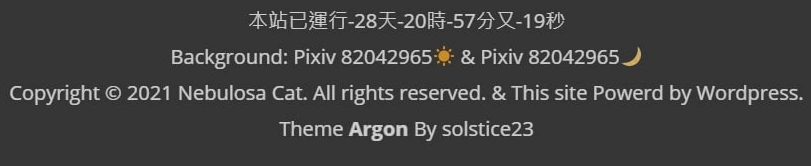
到這邊就差不多結束了, 可以呈現出這樣的效果 :

附錄
前面使用到的一些HTML語法 :
//在每個區塊加上<div>和</div>(區域元素)可以避免跑版 |
相關推薦

2021-08-26
Hello World
Nani ? ! 成功了?! 連老婆們都不相信(X 這就是本站誕生以來的第一篇文章Linux新手架站, 竟然, 成功了! 令人意外的是, 即便是現在資訊那麼發達的時代, 想架個部落格也不容易不但有各式各樣的廣告/推銷資訊擺在Google搜尋的前列, 還有一堆已經跟不上軟體更新速度的教學文挺考驗多方資料比對的能力 特別是在VPS虛擬機使用Linux, 透過軟體SSH連線中, 常常不由自主的Ctrl+V想貼上指令範本結果直接把還沒改過的指令或是不完整的指令就給送出去了=w= 然而這個差點難產的Blog還是成功出生了 可喜可賀, 可喜可賀
2022-04-08
在 Oracle Cloud & Ubuntu 20.04 系統環境下部署 Wordpress - 搬站總紀錄
這是一次搬站紀錄之前蹭 Github Student Pack 的 DigitalOcean VPS 試用金用完了, 趁著 Oracle 的虛擬機刷好了把部落格搬過去, 順便做一下紀錄, 畢竟每次裝環境總是有翻車的不確定性… 事前準備 Oracle VPS 一台 : Arm64v8、作業系統採用新手友善的 Ubuntu 20.04( 懶人刷 Oracle VPS 教學 : https://github.com/lemoex/oci-help ) 架站用的域名 ( Gandi、CloudFlare 都不錯用, 個人現在用 CloudFlare, 便宜 ) DNS 服務商 ( 個人用 CloudFlare, 沒什麼原因, 他最好用又不用錢 ) SSH 連線軟體 ( MobaXterm、TabbyAlpha 都好用 ) 可以收信的電子郵件 作業環境 Windows 11 Professional MobaXterm v21.5 ubuntu 20.04 實際操作 安裝順序 系統準備 > Apache > MariaDB > PHP > WordPress &...
評論